Become a Fan

Pages

WATCH WHAT HAPPENS WHEN ACTION CAMERAS TESTED ON EXTREME CONDITION

These guys put 4 action cameras to extreme test to find out which will survive the end and still function. The action cameras were the GoPRo 4, XiaoMi Yi, AMK5000 and Svacom Siime Eye camera.

How to Start Your First Online Business Without Investment

Is it possible to start on online business without an initial investment or capital? The answer is YES you can. There are website that sell digital products online in which you can affiliate with them and earn good commission for every sell you make. Some commission may reach from 50%-75%. Merchants are giving this high commission because they know you've done most the work like promoting and marketing.

In this article I am going to teach you how to start your own online digital business with Clickbank. I choose Clickbank because it has tons of digital products that you can choose from and some vendors or merchants have promotional materials that you can use to market their product. Various categories that you can start, they Parenting ebooks, Home and Garden, Business, Graphics ebooks, Marketing ebooks, Make money online ebooks, Health and wellness, etc.. There are numerous on every categories. So choose product that is profitable.

So start with:

1. Sign up Clickbank 


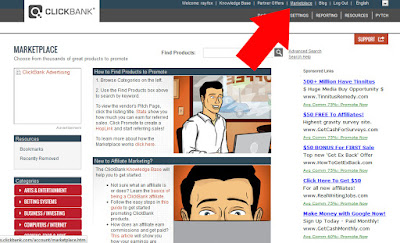
2. Next go to Marketplace tab


3. Browse through the categories or Simply use the Filter options to filter products that sells pretty well. Set the Gravity from 25%. Please see screenshot.


4. Next is to filter more by choosing vendors with Spotlight and Promotion Materials. Please see screenshot below.


5. Once you find a product that fits your criteria. Click the promote Button.


6. Enter your Clickbank ID and your Tracking ID - this will help you track where earnings are coming from.


7. Next use the link generated when you promote product. However the link is too long. Use a link shortener to shortened your link and also to avoid getting spam.

 
When you make a sell from that link you will be able to make commission from. 

Now promote your link to website or blog. Create a free blogger site so that you can start writing a review about the product. It works really well.

How I Increase My Adsense Earnings Using SEMRush Tool

Today I will be sharing to you guys my money making tool that I used. Its a simple and easy to use tool that help me increase my money on my adsense. Checkout screenshot below from 15 USD last month to 91 USD. I can't believe how quickly it went up. I learn about this tool about 3 months ago, I tried the trial period and use the tool to find high cpc keywords from popular domain sites. I never thought that I will be able to increase my money in such short period of time. Its a very effective tool and I assure that anyone with little knowledge will be able to make money using this tool.

This tool has been used by so many popular bloggers. You too can acquire these tool now and increase your adsense earnings significantly by the next month just like mine. Take a look at the screenshot of what these tool will give to you.


As you can see that long tail keyword "cheap email marketing services" has 45.56 USD. You can target this long tail keyword if you're website is all about email marketing. You will definitely see great results when you apply these keywords to your blog post. You can do a lot more using this tool. Go ahead and use this tool now.

Checkout proof of earnings:


Heres how I increase my money:

1. Sign up SEMrush - its a tool that will help you find high CPC for adsense so that you can target keywords for your next website content. It is important that you aim high adsense CPC so that you won't waste your time creating content and targeting keywords that has low CPC.

2. Go to Facebook search for Safe Adsense Visitor - this is a safe traffic for your website. They provide worldwide traffic and you can target US, UE traffic too. Contact the administrator so that you can try their service for free. This is by far the best adsense traffic that I used. Traffic are highly targeted to your topic or keyword, and so visitor will most likely click your ads. So go ahead and start making money.

Thats it!

I hope the next time you check your adsense earnings, you won't be disappointed.


Best Hard Drive Data Recovery Services Company Today

A few years back, I remember when I first attended the Seagate seminar hosted by Mr. Tony Tsao. He speaks about their new hard disk product and the tough quality of their product. He confidently drops the hard drive from 4 ft high above the ground, test and run the drive and its working fine. He also speak about some company's willing to pay huge amount of money for hard drive data recovery services. He said a certain company had approached him and ask if he could salvage the data from a damage hard dive and they'll pay a million to recover the data?


Back then I was working as a computer technician, however I don't specialized on recovering data especially from physically damaged hard drive. But I tend to try tools that might help recover data from accidentally formatted drive. I've first tried hard drive recovery laptop and uses recovery software. Effective data recovery software that works on my experience is the Recuva and Undelete Plus. There are many software for disk drive data recovery that's available in the internet. Some are free but some are paid. Whichever you choose, make sure that you've done thorough research about their data recovery software.

Type of Data Recovery

1. Data Recovery Raid - raid recovery is aim to search for lost raid configuration parameters. You will use data recovery raid only when there are visible damage of the raid controller card such us burnt component in which no other replacement can be found. Or raid controller reports a double hard drive failure in Raid5.

2. File Data Recovery - only recovers data from broken filesystems and the outcome is the file and folder recover.

Hard Drive Data Recovery Services 


Hard drive recovery laptop for severely damaged disk must consult experts for hard drive data recovery services to retrieve important and critical data. For raid server data recovery, you can try utilities available in the market and take a look at their raid recovery application. There raid server data recovery application that are free to use, you can evaluate them then buy if you it recover your file so that you can use full access of the application.

However you can always try to clean your laptop or desktop to try to fix the problem. Example troubleshooting your laptop, you can try cleaning ports and terminals where hard drive is attach. Some users claimed they were able to fix their problem by cleaning terminals. A success hard drive recovery laptop will need a little bit of skill to troubleshoot your machine. You can always consult youtube and search about your laptop.


None the less, if your hard drive is physically damage then you need to look for data recovery expert team that will retrieve the data. These people has the right tools and expertise to make sure that your precious data will be recovered. However you'll have to pay the right price too for the hard drive data recovery services they do. According to Lifehacker site, Ontrack has done a great job for this type of services. Another well known company that retrieve data from damage hard drive is DriveSavers. Both company's can performed hard disc recovery service on the highest expert level.

Ontrack - Kroll Ontrack can provide state-of-the-art hard drive data recovery services and data recovery software. Recovered from all types of corrup, deleted, missing, or inaccessible data loss fast and securely.

What they can recover:

  • Physical, virtual and cloud
  • Any desktop, laptop, server, RAID, Network, virtual device or mobile
  • All types of files and operating systems
  • All causes of data loss 

DriveSavers - DriveSavers Data Recovery, one of the best hard drive data recovery services that offers huge data retrieval services with its state-of-the-art tools since 1985.

DriveSavers Supports the following device and services:

  • Data recovery raid
  • Hard disc recovery services
  • SSD data recovery services

Media and other Devices:

  • Laptop
  • Desktop
  • Mp3
  • Iphone, Ipad
  • Digital Cameras
  • Removable Devices
  • SSD
  • RAID / NAS / SAN

Both company's has been doing data recovery for many years and had high reputation and considered as the best hard drive data recovery services out there. Like I said, if you need to have your data retrieve by these company's then make sure you have enough money to pay for their services.

Other than that, if you don't have enough money to pay these guys then you might wanna investigate what causes your hard drive not to function. There are information like on Youtube that gives you idea on how to repair hard drive especially the click of death if that's the case that you have then you better try your luck and see what happens. Who knows you might fix your hard drive in no time.

How to Perform a Hard Drive Recovery By Yourself

If you think that you can do it by your own, fixing your hard drive. Then you better take a deep breath because you're going to try disassembling the drive from its case and expose the disc. Please do these at your own risk, I will not be held liable for what you're going to perform.

Before you open your hard drive, make sure that you perform in an enclose area to avoid dust contacting the surface of the disc.

Fixing the Hard Drive - Stuck Head - Buzzing Sound

Listened to the sound that it generates when you powered up your hard drive. If you hear a buzzing sound then the hard drive might have stuck heads which can be fix.


Here's how to fix it:

1. Open your hard drive by unscrewing those tiny little screws. Be mindful that some screws are hidden at back of the sticker. You can feel the hidden screw when you try scratching the surface of the sticker.


2. Once you've open the hard drive, you'll notice that the hard drive head is at the middle of the platter. You'll going to move that head to the right position.


3. Move the head to the right position using small hook tool to pull it back in place while spinning the platter counter clockwise to avoid stressing the head.


4. Once you've done that successfully, investigate the platter for any foreign particles. Make sure that its clean before you putting it back on.


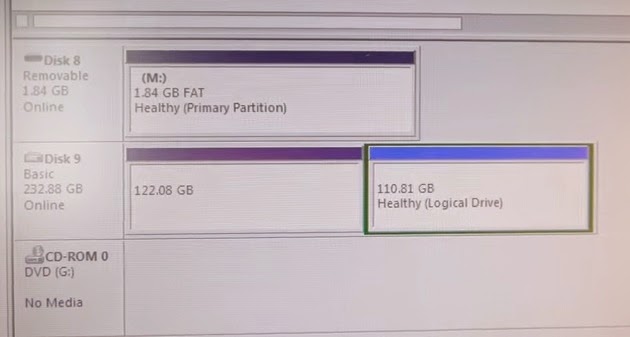
5. After you put it back on, you can now try it by attaching it to your computer. Use windows disc management tool to check the drive. You should be able to see your disk as illustrated below.


For more information about hard drive data recovery please subscribe.


Related Article: How to Repair Any Laptop Motherboard

The easiest way on how to reset windows 8.1 administrator password

How to Reset Windows 8.1 Administrator Password

In here you will learn how to reset windows 8.1 administrator password using a third party software. The software will easily unlock/reset all local password including administrator accounts.

If you are using windows 8 or the latest upgrade windows 8.1 operating system released by Microsoft on August 2013.

Windows 8.1 after its released had fix some issues by from previous version windows 8. For that it received positive reviews and feed backs from users. But still some had criticised for not addressing some other issues concerning privacy and poor level integration. You can find more information about windows 8.1 here.

Anyways, for me windows 8.1 is one of the best thing microsoft had done to their operating system period.

How to configure LEGACY SUPPORT on HP Pavillion G7 laptop

In this how-to article, I used HP Pavillion G7 with windows 8.1 operating. I'm going to show you how to reset windows 8.1 administrator password on an HP Pavillion G7 laptop.

The HP Pavillion G7 laptop will need to be configured in the BIOS to boot on to CD/DVD. Then ENABLE LEGACY SUPPORT under BOOT OPTIONS.


Note to HP Pavillion G7 owner. Power ON your laptop then continuously press ESC button then PRESS F10 to boot to BIOS. Please refer to the video below this post.

Now to Reset Windows 8.1 administrator password, follow procedure below:


Lets start:

Before you're going to reset windows 8.1 administrator password you need to download a free third party software that will easily unlock/reset the password. So this means that you need another computer that can access the internet then download the software. When you have downloaded the software you will going to install then produce a blank CD/DVD so that you can create a copy of it in CD/DVD.

1. Download the software here. Make sure to download only the free edition.


2. Install the software into computer that has CD/DVD burner or copier.


3. Select the appropriate windows version. Since we are to reset windows 8.1 administrator password, choose windows 8.1 32bit/64 bit. Click NEXT after wards.


4. In the Bootable Media Selection - choose CD/DVD - then click START button.


5. After copy is complete. Put CD/DVD that contains the windows 8 password unlocker.
6. Configure your computer to boot on CD/DVD on your Bios Configuration.

Watch the video below.

To reset windows 8.1 administrator password is very easy it takes only about 10 minutes. Just make sure that you have copied either to CD/DVD or USB the windows password unlocker program.


Lets start to reset windows 8.1 administrator password quickly.  

How To Install Windows 7 Pro Dell Inspiron 11 3000 With Complete Drivers


Do you own a Dell Inspiron 11 3000 laptop which came with installed windows 8 that you don't like the operating system and wish you had windows 7 pro instead? Many owners of the product had ask if its possible to install windows 7 pro operating system. The answer is yes, definitely possible. If you have a legal copy of the windows 7 pro then you can install it on your system.

How about Dell Inspiron 11 3000 windows 7 pro drivers, no problem you can install these driver with ease. You can download drivers for windows 7 pro on their website. Just simply provide the service tag of your laptop or let the website detect those device drivers for you. However USB driver might need a little driver update. You need to download the USB driver for Dell Inspirton 11 3000 for windows 7 pro at intel resources. You can download it here though in the link that will be provided later on as you install windows 7 pro.

The best to install windows 7 pro on your dell inspiron 11 3000 is by using flash drive. However external cd/dvd rom would be an option too. But preferably using a flash drive will do the installation more quickly and easily. If in the later in the process, you will encounter problem or errors such as not continue to install windows 7, please make sure that you have good copy of windows 7 pro if you're installing in on external cd/dvd disc. Damage on disc or external rom will result errors throughout the process.

To install windows 7 pro using a flash drive, please download the windows usb dvd download tool here. Install the small software in your computer after you've downloaded it.

How to put windows 7 pro into your flash drive:

1. Open Windows USB DVD Download Tool
2. Next navigate through the windows 7 pro ISO file
3. Then use USB device to start copying windows 7 to your flash drive
4. Wait until the process is done

By this time you now have windows 7 pro flash drive or usb drive. You may now be able to use this to install windows 7 pro on to your dell inspiron 11 3000. To start the installation, simply navigate to main root folder of the drive then click Setup. You should be able to start the installation process.

If you will encounter errors such as bootsec, you will have to go to microsoft store account and download the bootsec file then place in to your windows usb/dvd download tool. In there you'll have to run the program again to create a bootable drive windows 7 pro. Go ahead read more about this at microsoft.

For information about how to fix boot error please click here.

Once you've finish installing windows 7 to your dell inspiron 11 3000, then its time to install all the necessary driver that is compatible to your new operating system. The official driver for dell inspiron 11 3000 driver download is at the Dell site. Please click here to go the official download page of dell. Simply enter the service tag of your dell laptop when you downloading drivers.

For USB drivers, you may need to go here at intel's download page. You should be able to download usb driver for dell inspiron 11 3000 perfect for windows 7 operating system. For more information about dell inspiron 11 3000 usb driver, please go to the review section.

I hope that you find this information useful. If you have any question about this article please don't hesitate to post at the comment section. Please share this article.


How to activate windows 8 professional offline using activator


There are two methods to activate your windows 8 pro. The first is by providing the original license key which can be acquired when you purchase your windows 8 pro. The second method is by using a special activator which automatically activate your windows 8 pro. Whatever method you use, make sure that you have the original windows 8 professional software installed in your computer and have the license key.

To activate your windows using license key follow the procedure below on how to activate your copy.

1. Open command prompt
2. Type "slui 3"
3. Enter the product key
4. Click activate to finish your activation

The second method uses a simple activator. Heres how to active your windows 8 pro activator.

This method uses the windows 8 activator that will easily activate your windows. You will have to download the activator here then use it to activate.

1. Download windows 8 pro activator
2. Extract to desktop
3. Open extracted file
4. Double click the activator
5. Ignore warnings when activation
6. Restart windows 8 pro to finish activation

You should be able to active your windows 8 using both methods. If there are errors during windows 8 activation please checkout some solution here.

Some errors that might occur during activation, make sure that you've acquire the original windows 8 other than windows 8 crack pirated disc.


  • fix windows 8 activation error 0xc004f074
  • fix windows 8 rtm activation error 0xc004f074
  • fix windows 8 activation error 0xc004f061
  • windows 8 activation error 0xc004c008
For solution windows 8 pro error activation please go to official microsoft support for fix.

How to burn downloaded movies to dvd

If you have downloaded movies and want to transfer it to your dvd then you should have a burning software that will able to accept files like flv, mkv, mp4, avi or m4v. If you want to burn youtube videos to dvd, you will have filename flv or mp4 format. Your burning software must able to convert this file before actual burn to dvd.

You might as well like mkv burn to dvd then your burning software must easily convert this filename to dvd format. There's a good software that converts a lot of different formats you might not have a knowledge of. The best burning software that I've tried so far has not given me any problems and it is easy for me to use. I just drop all movies with different format onto the burning software then let it convert and burn to dvd. It is really easy, and you can even add up to 3 to 4 movies in just one dvd yet still maintaining good quality. However you may tweak the dvd burning software to your own settings.

If you are burning mp4 to dvd then you should try out the software that I used for all formats which converts to dvd.

How to burn downloaded movies to dvd:

1. I downloaded burning software in the internet.
2. Then I drop all movies on to the pane. See screenshot.


3. Then click Convert. It will now convert those mp4, mkv, avi, flv, m4v, mpg, and etc.. then burn to dvd.

So months of using it, I consider this as the best burning software for dvd. It gives me easiness of usage and no problem or glitch while using this software. You can download this free burning software to the internet. I hope this helps on how to burn dvds. Checkout some of my post.

Asrock Z97 Extreme6 Pros and Cons

Lets checkout some of the Pros and Cons of Asrock Z97 Extreme6 desktop motherboard from different reviews of different sites. Sites like overclockers have not sited any bad issues about this product however techereport has some build issues on this product. 

So before you buy this motherboard, take time to read the following list of positive and negative reviews of Asrock Z97 Extreme6 in terms of performance, build and price.

Overclockers point of view:

"With this newest Intel chipset (and set of motherboards) there are more incremental upgrades than performance boosts. The most notable of these upgrades is Haswell Refresh and upcoming Broadwell CPU support along with M.2 SSD support. I’m normally a “bad news first” person, so I’ll mention the bad things first. Alright, I’ve got nothing. This board has no issues that I was able to find! It is stable when pushing the limits, has an awesome UEFI, and is bundled into an attractive design. To top everything off, this board is loaded with features such as Dual Gigabit Ethernet, Ultra M.2 (32Gb/s), Thunderbolt, Purity Sound 2, 10x SATA ports, and 3200 MHz DDR3 support.

From an overclockers point of view, this board has all you need to push for every last MHz. Integrated power/reset switches for open-air setups, BIOS chips that are a quick swap from new, a BIOS reset button, a physical BIOS switch, 12 phase digital power delivery, and a slew of overclocking options in the UEFI.

Flipping the coin, the ASRock Z97 Extreme6 comes in at an extremely competitive price. It is currently $169.99 at Newegg, beating out a very comparable Maximus VII Hero by $50! This price point makes it a great board for most budgets looking at the unlocked Intel CPUs. Now for the rating. Stable? Very. Looks? Amazing. Features? Loaded like a Cadillac. Add to this great overclocking capabilities and the amazing price, and I’m wishing there was something above “Approved”!"

source: http://www.overclockers.com/asrock-z97-extreme6-motherboard-review

Techreport point of view

"Even though the Extreme6's hardware spec hits a lot of the right notes, the board still falls short in a few important areas. The I/O shield is littered with metal protrusions that can slice fingers and get caught up in the rear ports during installation. Also, there are no provisions to simplify the wiring process for front-panel connections. There's no way to boot directly into the firmware, either, though ASRock provides a software utility that reboots into the UEFI from Windows."

source: http://techreport.com/review/27181/asrock-z97-extreme6-motherboard-reviewed


Solution MAC OS 10.6 Skype Won't Run

I recently solved the problem of my friend MAC laptop when skype that won't run after installation. After a quick download and installation of the latest skype messenger, the latter won't open or run and have prompts error. Re-downloaded skype and installed again, the same error would occur. I'm not a MAC OS X user but given this opportunity to help a friend, I've taken time to research the solution of skype unable to run on MAC OS X.

After a few minutes on checking on possible solution from forums on users who had the same problem. I finally know what causes the problem and how to solve it. Its a quick solution for skype won't run on mac os x. You don't have to install any other programs or patch to fix skype error on you mac osx . All you gotta to do is to install the appropriate version of skype that is compatible to your mac os x build version. Yep, you need to check your mac os x version and find the right skype version. So if you're running the old mac os x then you should find the compatible skype version to fix the problem.

What causes skype won't run on your mac os x is that you might have updated your skype, while your mac os x version is not compatible with the new update. So all yo have to do is to check your mac os x version first by navigating to the ABOUT THIS MAC.

If you have the old mac build version then you should download the old skype version that works. There's a particular site that has all the old applications for mac, windows, linux and timeline. You will find the appropriate old application like skype that works on your mac os x build version.

For example if you have MAC OS X version 10.6 then you can download and install skype 6.9.0.517 which is compatible and will run.

Click here to go OLD Apps skype for MAC OS X 10.6


I hope you find this helpful, please share.


How to Upload Large Video Files on Youtube While Maintaining Quality

How to a upload large video file size is to reduce its size first. To do that you need a software called Handbrake. It works really well on mp4 format videos.

Having a very large video file size to upload to your favorite social media sites will take too long without reducing it size first. But reducing video file size may affect quality, not really. There's a software that could almost maintain its quality even the size is reduced to about 50% or more. Don't believe me? Then try this at your home computer. The software is called HandBrake, that converts and reduce video file size. Best of all its a free software.

Here's how:

1. Download Handbrake here then install it to your computer. Then open the program. It should like the image below.


2. Open source file to reduce.


3. Click BROWSE then specify folder where to save your video file after reducing file size. Please don't forget to write a name for your file.


4. Next click the Video tab. Change the settings as seen below.


5. Click START button.


6. Wait after conversion is complete.

7. Test and try the video.

8. You may now upload your video on Youtube or other video sites faster.

I hope you find this post useful. Please don't forget to share this article. Thank you

Twitter Delicious Facebook Digg Stumbleupon Favorites More